Install Smart Logger

Enjoy lightning-fast logging anywhere – even offline.

Show Instructions

Installation Guides

If you don't see an install option, simply bookmark the app – it will still work offline.

Missed the banner?

You can re-open the install banner by clicking on your user callsign (top left of "My Smart Logs" page) and then "Install App"


Manual install instructions


Make sure you install Smart Logger from the main app page! (My Smart Logs).

Click here for Mobile instructions

Steps to install on Chrome (recommended browser)
Step one

Go to the main app page and find the three dots icon in the upper right
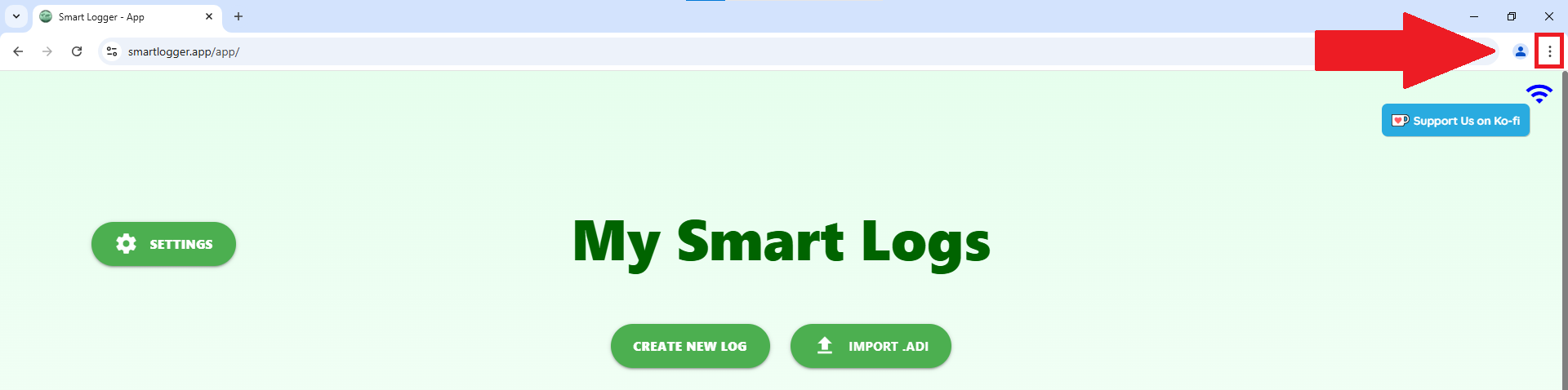
Go to app


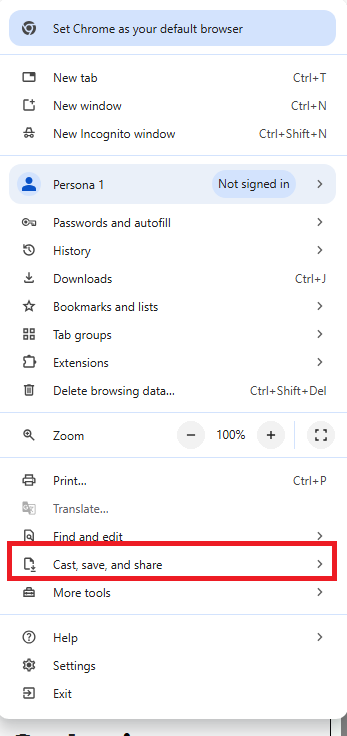
Step two

Clicking on that icon, you open Chrome's menu, select "Cast, save and share"

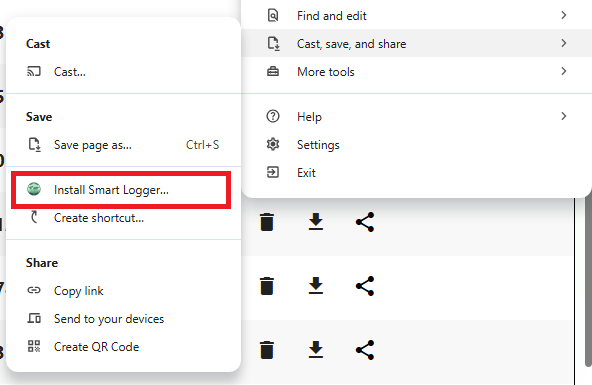
Step three

Click on "Install Smart Logger"
Instructions for other browsers

Safari
  • Navigate to the app main page (smartlogger.app/app)
  • Press the "Share" Icon
  • Press "Add to Home Screen"
  • Tap "Add" to finish installing
Chrome Mobile
  • Navigate to the app main page (smartlogger.app/app)
  • Press the "3 dot" icon in the upper right
  • Select Add to Home Screen
  • Click on "Install Smart Logger"
Edge
  • Navigate to the app main page (smartlogger.app/app)
  • Press the " 3 dot" icon in the upper right
  • Click on "App"
  • Click on "Install Smart Logger"
If you find any compatibility issue, please report it in our Discord server, thank you!